
HELP CENTER

How can we help?

Search our knowledge base or browse categories below to find answers about SerpClix.

πŸš€
Getting Started
Getting started with SerpClix
8 articles β†’
Creating & Managing Orders
Create and manage your click orders
10 articles β†’
πŸ“‹
Account, Billing & Credits
Using your account, billing and credits
6 articles β†’
Strategy & Troubleshooting
Tips and tricks for maximizing value
7 articles β†’
πŸš€
Getting Started
8 articles
Our competitors use bots and automated programs to simulate Google searches and clicks.
SerpClix is the only service that sends real human visitors to search your keywords and visit your website. We have a pool of over 300,000 clickers who we pay individually to complete your click orders. There is no other service that offers this amazing and complex crowd-sourced system.

SerpClix uses real human clickers because fake automated or robotic clicks DO NOT WORK. Public proxies are always detectable by Google. Private proxies do not have enough of a random IP address range. PhantomJS and other popular headless browsers leave footprints that are very difficult to cover.

Google is the leading expert in the world at detecting robotic traffic. Their entire advertising business depends on being able to tell human visitors apart from bots. The leaked Google API documentation revealed 10 specific signals used by Google's click manipulationΒ detection systems β€” from pattern analysis to Chrome browser data.


In fact, Google manages the most popular service for preventing robotic traffic, reCAPTCHA:
If you've ever encountered one of the little "I'm not a robot" check boxes you've experienced Google's anti-robot platform. And the newer versions of reCAPTCHA work behind the scenes and don't even need the checkbox to know whether you are a robot or not.

Unfortunately real humans are more expensive than robots, and SerpClix is more expensive than fake bot traffic. But - as with so many things - you get what you pay for!Β 

Please don't throw your money away or, worse, get your site penalized by buying fake bot traffic from other services. Let SerpClix's army of real human clickers drive targeted traffic to your website, increase your organic CTR, and boost your SEO rankings.
Read full article β†’

Yes. Because SerpClix uses real people performing real Google searches, the traffic appears as genuine organic search traffic in your analytics platforms.

Google Search Console

Clicks from SerpClix clickers will appear in your Search Console performance reports under the keywords they searched for. You'll see increases in both clicks and impressions for those keywords. This is one of the best ways to verify that your orders are being fulfilled and to monitor CTR changes over time.

Google Analytics (GA4)

SerpClix traffic appears as organic search traffic in GA4. You can find it under Reports β†’ Acquisition β†’ Traffic Acquisition, filtered by the "Organic Search" channel.

Tips for tracking SerpClix traffic

  • Use the second URL option when creating orders. This ensures each visit includes at least two page views, which means the visit won't be counted as a bounce in Google Analytics.
  • Cross-reference with your SerpClix dashboard. Compare the click dates and volumes shown in your SerpClix account with what you see in Analytics and Search Console.
  • Use Google Search Console for keyword-level data. GSC shows you exactly which queries are driving clicks, making it easy to see the impact on specific keywords you're targeting.
  • Allow for reporting delays. Google Search Console data can take 2–3 days to fully populate, so don't expect instant confirmation.
Read full article β†’

Are there guarantees?

No. If any SEO service offers you a guarantee of specific rankings, that should be a red flag. There are no guarantees in SEO β€” Google's algorithm considers hundreds of factors, many of which are unknown and subject to change at any time.

What we can point to is a body of evidence that CTR is a ranking factor, along with case studies from customers who have seen measurable improvements. Many professional SEO agencies actively use SerpClix as part of their client strategies, which speaks to the perceived value of the service within the industry.

Is it risky?

All SEO techniques carry some degree of risk. For a detailed look at how Google detects artificial clicks β€” and why real human clickers are fundamentally different from bots β€” see our research at NavBoost.com.


That said, we believe SerpClix is significantly less risky than alternatives for several reasons:

Real human behavior. Because our clickers are real people performing real searches with real browsers and genuine IP addresses, the traffic pattern is indistinguishable from natural organic behavior. There are no bot fingerprints, proxy signatures, or automated patterns to detect.

No penalty incentive for Google. If Google penalized sites simply for receiving clicks, it would create an easy negative-SEO attack vector β€” anyone could harm a competitor by sending clicks to their site. Google has to be cautious about unintended consequences like this. In fact, this exact dynamic played out years ago with link-based penalties, which were quickly weaponized against competitors.

Industry track record. SerpClix has been operating since 2016 and has served thousands of customers. We are not aware of any customer who has been penalized as a result of using our service.

That said, we always recommend a measured, gradual approach. Dramatic, unnatural-looking spikes in CTR are more likely to be filtered out or flagged than steady, sustained improvements over time.

Read full article β†’

Yes. We offer a free 14-day trial that includes 500 credits β€” enough for approximately 55 clicks in our All Countries tier or about 29 clicks in an individual country tier.

What's included

  • Full access to the SerpClix platform and all order types
  • 500 credits to use over 14 days
  • Ability to create click orders for any keyword, URL, and search type
  • Access to the Order Wizard and Classic Order Entry tools

Frequently asked questions about the trial

Do I need to enter payment information? Yes. We require a credit card or PayPal account to sign up. This helps us prevent fraud and ensures an uninterrupted experience if you choose to continue after the trial. You may see a small temporary authorization on your card to verify it's valid β€” this is not a charge.

Will I be charged during the trial? No. If you cancel before the 14-day trial period ends, you won't be charged anything.

What happens when the trial ends? After 14 days, your account converts to the paid membership plan you selected during registration. You can change or cancel your plan at any time from the My Membership page.

Can I change my plan during or after the trial? Yes. You can upgrade or downgrade at any time from the My Membership page.

Will I see results during the trial? The trial is designed to give you a firsthand look at how the platform works and to verify that orders are being fulfilled. However, 14 days is generally not long enough to see significant ranking changes. We recommend allowing at least 2–3 months to evaluate the effectiveness of a CTR optimization campaign.

Is the trial limited? The free trial is available once per user. Abuse of this policy will result in a permanent ban.

Start your free trial β†’

Read full article β†’

There is substantial evidence from both independent research and Google's own statements that click-through rate plays a role in search rankings. Here's a summary of the key evidence.

Google's own statements

Google representatives and official documents have acknowledged the role of click data on multiple occasions:

  • A Google patent states that "user reactions to particular search results or search result lists may be gauged, so that results on which users often click will receive a higher ranking."
  • Google's former Head of Search Quality, Udi Manber, testified that ranking is affected by click data, giving the example that if 80% of users click result #2 instead of result #1, Google will eventually adjust those rankings.
  • A Google engineer noted publicly that "using click and visit data to rank results is a very reasonable and logical thing to do, and ignoring the data would have been silly."
  • In FTC proceedings, Google co-founder Sergey Brin and former CEO Eric Schmidt confirmed that click data provides important feedback on result quality.

Independent research and experiments

SEO researchers have conducted numerous studies and experiments on CTR's impact:

  • Rand Fishkin's experiment (Moz): In a well-known live test, Fishkin asked his audience to search for a specific term and click a particular result. The result moved from position #7 to #1 in under three hours, demonstrating how responsive Google's algorithm can be to click patterns.
  • Coreter Media case study: A UK-based SEO firm tested SerpClix on keywords already ranking in the top 5. After sending 15–25 clicks per day, rankings improved from an average of 4.7 to 1.7 within about a week.
  • Multiple industry publications β€” including Search Engine Journal, WordStream, and Moz's Whiteboard Friday series β€” have published research and analysis supporting CTR as a meaningful ranking signal.

The broader picture

While the exact weight Google gives to CTR in its algorithm is unknown (and likely varies by query type), the consensus among SEO practitioners is that user engagement signals β€” including CTR, dwell time, and pogo-sticking behavior β€” play an increasingly important role in rankings.

For a balanced perspective on expectations, see CTR Is One Ranking Factor Among Many.

For a comprehensive compilation of the evidence β€” including the 2024 Google API leak and antitrust trial testimony β€” see the complete evidence that CTR affects rankings.

Read full article β†’

SerpClix is a crowd-sourced CTR (click-through rate) optimization platform. We pay real human clickers to search for your keywords on Google and click on your listings, driving genuine organic search traffic to your website and sending positive ranking signals to Google.

How the process works

Here's what happens when you create a click order:

  1. You create a click order β€” You provide a keyword phrase, your target URL, and configure options like geographic targeting and click volume.
  2. A real person searches Google β€” One of our clickers receives your order and searches for your keyword phrase on Google, just as any natural searcher would.
  3. They find and click your listing β€” The clicker scrolls through the search results until they find your URL, then clicks on it.
  4. They engage with your page β€” Once on your site, the clicker scrolls and stays on the page for approximately 60 seconds. If you've specified a second URL, they'll navigate to that page and spend additional time there.
  5. They exit naturally β€” When finished, the browser tab closes. The clicker never clicks the back button to return to search results, which keeps the engagement signal positive.

Why real humans matter

SerpClix is the only CTR service that exclusively uses real human clickers. We have a pool of over 400,000 clickers worldwide, each using their own real browser and real IP address.

This matters because Google is extremely sophisticated at detecting artificial traffic. Automated bots, proxies, and headless browsers all leave detectable fingerprints. Google's entire advertising business depends on telling humans apart from bots β€” they even built reCAPTCHA, the world's most widely used anti-bot system. This also works because Google's NavBoost system has been documented as an important part of their ranking algorithm.

Our clickers produce traffic that is indistinguishable from natural organic search behavior, because it is natural organic search behavior β€” performed by real people on real devices.

What you can do with SerpClix

  • Google Search CTR optimization β€” Boost the click-through rate for your organic search listings
  • Google Maps / Business Profile β€” Drive clicks to your local business listing
  • YouTube β€” Promote your videos in search results
  • Bing β€” Target Bing search results
  • Google News, Images, and Videos β€” Target specialized search verticals
  • Direct Traffic β€” Send real visitors directly to any URL
  • Google Autocomplete β€” Influence search suggestions through real search volume
  • Reputation Management β€” Boost positive listings and push down negative ones

Getting started

Setting up your first click order takes about 60 seconds. You can use our Order Wizard to automatically discover keywords you already rank for, or use the Classic Order Entry tool to manually configure any order type.

Start your free 14-day trial β†’

Read full article β†’

While there is strong evidence that CTR influences rankings, it's important to understand that it's one signal among hundreds that Google considers. Setting realistic expectations is key to getting the most value from SerpClix.

What CTR optimization can do

  • Increase the organic traffic to your listings
  • Send a positive engagement signal to Google for your target keywords
  • Complement and amplify the effectiveness of your other SEO efforts
  • Help you gain a competitive edge when other ranking factors are closely matched

What CTR optimization cannot do

  • Override fundamental SEO deficiencies like thin content, poor site speed, or lack of backlinks
  • Guarantee a specific ranking position
  • Produce instant or permanent results on its own
  • Compensate for targeting keywords that are far beyond your site's current authority

Our recommendation

SerpClix works best as part of a well-rounded SEO strategy. Before focusing on CTR optimization, make sure you have the basics covered:

  • Quality content that genuinely serves the searcher's intent
  • Technical SEO β€” fast loading, mobile-friendly, properly indexed
  • On-page optimization β€” relevant title tags, meta descriptions, header tags
  • Backlinks from reputable, relevant sites

Once these foundations are in place, CTR optimization through SerpClix can provide meaningful additional lift. We generally recommend allowing a minimum of 2–3 months to evaluate the effectiveness of your campaign, and taking a slow-and-steady approach rather than trying to force dramatic overnight changes.

Read full article β†’

CTR stands for click-through rate β€” the percentage of people who click on your listing after seeing it in search results. For example, if your page appears in Google search results 1,000 times in a month and 50 people click on it, your CTR is 5%.

Why CTR matters

CTR is significant for two reasons:

1. It directly determines your traffic. No matter how high you rank, if people aren't clicking on your listing, you're not getting visitors. A page ranking #3 with a high CTR can actually receive more traffic than a page ranking #1 with a low CTR.

2. It influences your rankings. There is substantial evidence that Google uses click behavior as a ranking signal. In 2024, leaked API documentation confirmed that Google uses NavBoost β€” a click-based re-ranking system β€” to adjust search positions based on user click behavior. When users consistently choose your listing over competitors for a given search query, it tells Google that your page is particularly relevant for that query. Over time, this can lead to improved rankings.


Average CTR by position

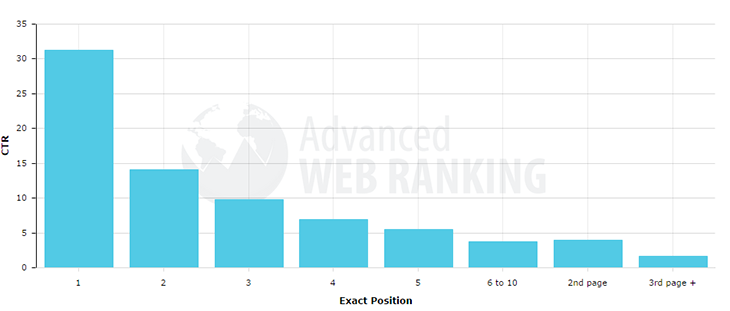
CTR varies significantly depending on your ranking position. Based on industry research, approximate average CTR rates for Google's first page are:

PositionApproximate CTR
#128–32%
#214–17%
#310–12%
#47–8%
#55–6%
#6–102–4%

These numbers mean that even a one-position improvement can significantly increase your traffic.

How SerpClix helps

SerpClix increases your organic CTR by having real people search for your keywords and click on your listings. This does two things: it sends direct traffic to your site right away, and it signals to Google that your listing is relevant and engaging for those search queries, which can contribute to ranking improvements over time.

Important context

CTR is one of many factors that influence rankings. It works best as part of a comprehensive SEO strategy that also includes quality content, technical SEO, backlinks, and on-page optimization. See our article on CTR as one ranking factor among many for more on setting realistic expectations.

Read full article β†’
Creating & Managing Orders
10 articles

The number of clicks you need depends on three factors: your keyword's monthly search volume, your current ranking position, and the position you're targeting.

We start with the average CTR (click through rate) for each ranking position, which you can get by searching Google or use the chart below from Moz.com:
expected SERP CTR chart for first page of Google

To understand what click-through rates are typical for your current position, see CTR benchmarks by searchΒ position β€” compiled from 5+ industry studies.

How to estimate your click volume

  1. Find the CTR difference. Look up the average CTR for your current position and your target position. For example, if you're in position #5 (approximately 6% CTR) and you're targeting position #3 (approximately 11% CTR), the difference is about 5%.
  2. Add a small buffer. Round up slightly to account for the additional searches your clicks will generate. In our example, call it 6–7%.
  3. Multiply by monthly search volume. If your keyword gets 1,000 searches/month, then 1,000 Γ— 7% = 70 clicks per month.

Use our CTR Calculator to simplify this math.

Target one position at a time. If you're in position #5, aim for position #4 first β€” not position #1. Once you've moved up, reassess and target the next position.

If you're not on page one, start by targeting position #10 (bottom of page one) and work your way up from there.

Spread clicks over more days. It's generally better to order fewer clicks per day over a longer period than to concentrate a large number of clicks into a few days. For example, 10 clicks/day for 30 days looks more natural than 300 clicks in 3 days.

Allow enough time. We recommend running campaigns for a minimum of 2–3 months before evaluating effectiveness. SEO changes take time to manifest.

Tools for tracking

You can track your keyword rankings and search volume using:

  • Google Search Console (free) β€” search.google.com/search-console
  • SEMRush or Ahrefs (paid) β€” Comprehensive keyword tracking and competitive analysis
  • Moz (paid) β€” Keyword rankings and domain authority tracking
Read full article β†’

Google Maps and Google Business Profile (GBP) orders work slightly differently from standard search orders. Here's how to set one up correctly.

Step-by-step setup

  1. Choose the Google Maps order type when creating your order.
  2. Enter a keyword phrase that includes both the subject and location β€” for example, "chicago illinois injury attorney" or "plumber near downtown seattle."
  3. Enter your business website URL β€” This should be your own website address (e.g., https://yourbusiness.com ), not your Google Maps or Google Business Profile URL.
  4. Enter your Business Name β€” This helps our clickers identify your listing among the map results.
  5. Optionally add a second URL β€” Another page on your website for the clicker to visit after the first page.
  6. Configure geographic targeting and click volume as you would for any order.

How it works from the clicker's perspective

The clicker searches Google Maps using your keyword phrase, finds your business listing by matching the business name, clicks on your listing, and then clicks through to your website. If you've specified a second URL, they'll visit that page as well.

Important notes

  • Always use your website URL, not the Google URL. The URL field should contain your business website, not a google.com/maps/...  link. Our clickers will find your Google Maps listing using the keyword and business name β€” they need your website URL to know where to go after clicking through.
  • If you don't have a business website, use a Direct Traffic order instead to send visitors directly to your Google Business Profile page.
  • Include the location in your keyword phrase. Since Maps results are location-dependent, your keyword should specify the area (e.g., "dentist portland oregon" rather than just "dentist").
Read full article β†’

When creating a click order, you can choose between two targeting tiers:

  • All Countries β€” Clickers from anywhere in the world (9 credits per click)
  • Specific Country β€” Clickers from one or more individual countries only (17 credits per click)

When to use All Countries

  • You want the widest possible pool of clickers, which means faster order completion and maximum IP diversity
  • Your website targets a global audience
  • You want to maximize clicks per credit
  • Your keyword phrase already includes a location (e.g., "dry cleaners Chicago IL"), which tells Google to show local results regardless of the clicker's location

When to use a specific country

  • Your website specifically targets users in one country and you want the traffic to match
  • You're running a local SEO campaign and want geographic consistency
  • Your analytics matter β€” you want traffic demographics to align with your actual customer base

Our recommendation

There's no single right answer. We have customers succeeding with both approaches. The All Countries tier offers better value and faster completion, while country-specific targeting provides more geographic precision.

Pro tip for local businesses: You can often get the best of both worlds by using the All Countries tier while including the location in your keyword phrase. For example, "plumber san diego ca" will cause Google to return San Diego results regardless of where the clicker is located.

Read full article β†’

Orders are denied when our clickers are unable to find your listing in the search results. Here's what that means and how to fix it.

Why orders get denied

On your Order History page, you'll see a Clicker % for each order. This shows the percentage of successful clicks relative to the number of attempts. A low Clicker % means our clickers are searching for your keyword but not finding your URL in the results. If the percentage stays too low, our system automatically denies the order.

Why this happens: Google heavily personalizes and localizes search results. The results you see when you search may be different from what our clickers see, due to factors like location, search history, device, and logged-in status.

How to fix it

You have several options:

1. Edit the keyword or URL. Change your order to target a keyword/URL combination that our clickers can reliably find within the first 100 search results. Try broader keywords, or verify your ranking using an incognito/private browser window.

2. Switch to Direct Traffic. If you just want to send visitors to your URL without a keyword search, convert the order to a Direct Traffic order. Our clickers will visit your URL directly.

3. Try a different search type. If your listing appears in Google Maps, YouTube, Google Images, or another vertical but not in standard search, try creating an order for that specific search type.

4. Cancel and start fresh. Cancel the denied order (unused credits are returned automatically) and create a new order with different parameters.

Prevention tips

  • Use the Order Wizard to discover keywords you actually rank for before creating orders
  • Test your keywords in an incognito browser window (not logged into Google) to see unbiased results
  • Target keywords where you rank in the top 100 results β€” if you're not indexed for a keyword, SerpClix can't help with that specific keyword (yet)
Read full article β†’

The GL parameter is a Google URL parameter that tells Google to return search results as if the searcher were in a specific country. It stands for "geolocation."

How it works with SerpClix

When you create a click order with a specific country selected, our system automatically appends the appropriate GL code to the Google search URL. This ensures that our clickers see search results localized to that country, regardless of where the clicker is physically located.

For example, a clicker in the UK doing an order with GL=US will see US-localized Google results.

When this matters

The GL parameter is most relevant when:

  • You're targeting a specific country's search results
  • You've noticed that your ranking position varies by geographic location
  • You want to ensure consistency between what our clickers see and what your target audience sees

Common GL codes

CountryGL Code
United Statesus
United Kingdomgb
Canadaca
Australiaau
Germanyde
Francefr
Spaines
Indiain
Brazilbr

In most cases, the GL code is handled automatically based on your order's geographic targeting settings. You typically don't need to configure it manually.

Read full article β†’

Using the Order Wizard

The Order Wizard is our recommended tool for creating click orders. When you enter a URL, it queries Google to find keyword phrases that URL already ranks for in the top 100 results, along with:

  • Your current ranking position for each keyword
  • Estimated monthly search volume
  • A suggested click volume based on that data

This makes it easy to identify your best opportunities and create orders with appropriate click volumes.

Using the Classic Order Entry tool

If you prefer to select your own keywords, you can use the Classic Order Entry tool. This is useful when:

  • You know specific keywords you want to target that the wizard might not have found
  • You want to create specialized order types (Direct Traffic, Bing, YouTube, etc.)
  • You want manual control over all order parameters

Tips for choosing keywords

Start with keywords you already rank for. CTR optimization is most effective when you're already appearing in search results. Focus on keywords where you rank in positions 4–20 β€” these have the most room for improvement with the least effort.

Be specific. Long-tail keywords (3+ words) tend to have less competition and more targeted search intent. "Best hiking boots for wide feet" is easier to move than "hiking boots."

Match searcher intent. Make sure the page at your target URL actually serves the intent behind the keyword. CTR improvements won't stick if visitors immediately leave because the page doesn't match what they were looking for.

What if the wizard is missing keywords?

The Order Wizard occasionally misses keywords due to Google's personalization and localization of search results. If you know you rank for a keyword that doesn't appear in the wizard, you can always use the Classic Order Entry tool to target it directly. Just keep in mind that if our clickers can't find your listing either, the order may be denied.

Read full article β†’

Viewing your orders

You can see all of your orders β€” active, completed, and cancelled β€” on the Order History page in your account. Each order shows its status, number of clicks completed, Clicker % (success rate), and other key details.

Click on any order to see its full detail page, including per-click activity logs.

Editing an order

You can edit most fields on an active order directly from its Order Detail page:

  1. Navigate to the order on your Order History page
  2. Click on the order to open its detail page
  3. Click Edit and make your changes
  4. Save your changes

Note: You can edit fields that don't change the total credit cost of the order (such as the keyword, URL, or second URL). If you need to change something that affects the credit total (like the number of clicks or geographic tier), the simplest approach is to cancel the order and create a new one using the Copy Order button, which prefills the new order form with your existing settings.

Cancelling an order

  1. Go to the Order Detail page for the order you want to cancel
  2. Click the Cancel button

When you cancel an order, any unused credits are automatically returned to your account balance. You only pay for clicks that were already completed. The returned credits can be used on any future order.

Read full article β†’

SerpClix supports several order types to cover different SEO goals. Here's what each one does and when to use it.

Google Search (standard)

Our most popular order type. Clickers search for your keyword on Google and click on your organic listing. Use this for standard SEO ranking improvement.

Best for: Boosting organic rankings for specific keyword phrases.

Google Maps / Business Profile

Clickers search on Google Maps for your keyword phrase (which should include a location, e.g., "chicago injury attorney"), find your business listing, click on it, and then visit your website.

Best for: Local businesses wanting to improve their Google Maps visibility. See How to create a Google Maps order for detailed setup instructions.

YouTube

Clickers search for your keyword on Google and click on your YouTube video when it appears in search results. This can help improve the visibility of your video content.

Best for: Promoting YouTube videos that appear in Google search results.

Bing Search

Same as Google Search, but on Bing. Clickers search for your keyword on Bing and click on your listing.

Best for: Improving rankings on Bing, which also feeds results to DuckDuckGo and other search engines.

Direct Traffic

Clickers visit your URL directly without performing a search first. No keyword is involved β€” they simply navigate to your page and spend time there.

Best for: Increasing overall site traffic when you're not yet ranked in search results, driving traffic to landing pages, or supplementing other campaign types.

Google Autocomplete

Clickers search for your keyword phrase on Google, which contributes to search volume for that phrase. Over time, this can influence Google's autocomplete suggestions.

Best for: Brand awareness and branded search suggestions.

Google News / Images / Videos

Clickers search within Google's specialized search verticals and click on your listing there.

Best for: Content that appears in News, Images, or Videos results rather than standard organic listings.

Reputation Management

Not a separate order type per se, but a common use case. You can create multiple orders targeting different positive URLs for the same keyword (e.g., your brand name), boosting favorable results while the negative ones naturally fall. You don't need to own or control the URLs.

Best for: Pushing down negative search results about your brand. See our blog post on reputation management for detailed strategies.

Read full article β†’

Creating a click order on SerpClix takes about 60 seconds. Here's how to get started.

The Order Wizard is the easiest way to create orders. It automatically discovers keywords your URL already ranks for and suggests how many clicks to order based on search volume.

  1. Go to the Order Wizard β€” Click "Create Order" from your dashboard, or go directly to the Order Wizard page.
  2. Enter your URL β€” Type or paste the URL you want to promote.
  3. Review your keywords β€” The wizard shows you keywords your URL already ranks for in the top 100 Google results, along with your current position and estimated search volume.
  4. Select keywords and click volume β€” Choose which keywords to target and how many clicks to order for each.
  5. Configure options β€” Set your geographic targeting (All Countries or a specific country), add an optional second URL, and review the credit cost.
  6. Submit your order β€” Confirm and your order goes live. Clickers will begin receiving it shortly.

Option B: Use Classic Order Entry (for advanced users)

The Classic Order Entry tool gives you full manual control over every aspect of your order. Use this when you want to:

  • Enter your own keyword phrases (rather than relying on the wizard's suggestions)
  • Create Direct Traffic orders (clickers visit your URL directly without a Google search)
  • Create Google Maps, YouTube, Bing, or other specialized order types
  • Access advanced options like custom visit duration

Key settings to configure

  • Keyword phrase(s) β€” The search terms your clickers will use. You can include multiple keywords per order; they'll be distributed randomly among clickers.
  • Target URL β€” The page you want clickers to find and click in search results.
  • Second URL (recommended) β€” An internal page on your site for clickers to visit after the first page. This eliminates bounces in Google Analytics.
  • Geographic targeting β€” All Countries (9 credits/click) or a specific country (17 credits/click).
  • Number of clicks β€” Total clicks for the order.
  • Clicks per day β€” How many clicks to deliver each day. We recommend spreading clicks out over more days rather than concentrating them.

After you submit

Your order will be reviewed and, if approved, immediately distributed to our clicker pool. You can monitor real-time progress on the My Clicks page and see order-level statistics on your Order History page.

Read full article β†’

When creating a click order, you can specify an optional second URL β€” an additional page on your site that the clicker will visit after spending time on the first page.

Why you should use it

We recommend using the second URL on every order. Here's why:

It eliminates bounces in Google Analytics. Google Analytics counts any single-page visit as a "bounce." When our clicker visits two pages, GA no longer records it as a bounce, keeping your analytics cleaner.

It creates a more natural visit pattern. Real visitors often browse multiple pages. A two-page visit looks more natural than a single-page visit, both in your analytics and to any system monitoring user behavior.

It's free. The second URL doesn't cost any additional credits.

How to choose a second URL

Pick any page on your site. Good options include:

  • Your homepage (if the first URL is an inner page)
  • A related article or product page
  • Your "About" page or "Services" page
  • Any page with engaging content

The specific page matters less than the fact that there's a second page view. The clicker will spend approximately 60 seconds on each page.

How to set it up

In the order creation form (either Order Wizard or Classic Entry), you'll see a "Second URL" field. Simply enter the full URL of the second page (e.g., https://yoursite.com/about  ). If you leave this field blank, the clicker will only visit the primary URL.

Read full article β†’
πŸ“‹
Account, Billing & Credits
6 articles

Monthly billing

All SerpClix memberships are billed automatically on a monthly basis. There are no long-term contracts or commitments. Each billing cycle, you receive a fresh allotment of credits that are added to any existing unused credits in your balance.

What's included

Each membership tier includes:

  • A monthly credit allotment (varies by plan)
  • Full access to all order types and features
  • The ability to create unlimited orders (within your credit balance)
  • Rollover of unused credits

One-time purchases

If you prefer not to have a recurring membership, we also offer one-time credit purchases. Scroll to the bottom of the My Membership page to see this option.

Plan comparison

Higher-tier plans offer significantly more value per credit. For example, the Gold plan provides substantially more clicks per dollar compared to the Starter plan. If you plan to use SerpClix consistently, upgrading to a larger plan is usually the most cost-effective approach. Many of our agency customers purchase larger packages and use the credits over time.

Visit our Pricing page for current plan details and pricing.

Read full article β†’

Credits are the currency you use to pay for clicks on SerpClix. Every membership plan includes a monthly credit allotment, and you can also purchase additional credits at any time.

Credit costs per click

Targeting TierCredits per Click
All Countries9 credits
Individual Country17 credits

See our pricing page.

How many clicks do your credits buy?

The number of clicks you get depends on which tier you use. Here are some examples:

Monthly CreditsAll Countries ClicksIndividual Country Clicks
4,500 (Starter)~500~265
12,000 (Bronze)~1,333~706
26,000 (Silver)~2,889~1,529
60,000 (Gold)~6,667~3,529

Use our CTR Calculator to estimate how many clicks β€” and therefore credits β€” you'll need based on your keywords.

Key credit policies

  • Credits never expire. Unused credits roll over month to month and remain in your account even if you cancel your membership.
  • Unused order credits are returned. If you cancel an active order, any unspent credits from that order are automatically returned to your balance.
  • Higher plans offer better value. The per-click cost decreases significantly at higher membership tiers. For example, the Gold plan offers substantially more credits per dollar than the Starter plan.
  • You can purchase more anytime. Visit the My Membership page to upgrade your plan or make a one-time credit purchase.
Read full article β†’

SerpClix accepts the following payment methods:

Credit / Debit Card

We accept all major credit and debit cards (Visa, Mastercard, American Express, Discover) through our secure payment processor. Card payments are processed automatically each billing cycle.

PayPal

You can pay via PayPal for both recurring memberships and one-time purchases. PayPal users also have the option to pause their membership billing (this option is not available for credit card payments).

Cryptocurrency

We accept Bitcoin and other cryptocurrencies through BitPay. To pay with crypto, select the BitPay tab on the payment page during checkout.

Invoicing

All paid memberships automatically generate invoices that you can download at any time from your account. Click Invoices in the upper-right corner of your account to view and download them.

How Can I Update My Credit Card Information

The easiest way to update your credit card information is to use the Purchase New option on your My Membership page:

https://serpclix.com/buyers/update-plan/

When you purchase a new membership the new credits will be immediately added to your balance, and the new subscription will automatically ​​​replace and cancel your previous subscription (you can only ever have one active subscription).

Read full article β†’

Downloading invoices

You can download invoices at any time from your SerpClix account:

  1. Log in and click Invoices in the upper-right corner
  2. View your list of available invoices
  3. Click on any invoice to download it

Updating your company information

If you need to change the company name, address, or other details that appear on your invoices, go to the My Profile page in your account and update your information there.

Billing questions

If you have questions about a specific charge or need billing support, contact us through the support form on our website. Please include your account email address and any relevant order or transaction details.

Read full article β†’

All membership changes are managed from the My Membership page in your account.

Upgrading or downgrading

  1. Go to the My Membership page
  2. Select the new plan you want
  3. Complete the checkout process

When you change plans:

  • The new credits are immediately added to your balance
  • Your billing date resets to one month from today
  • The new plan automatically replaces your previous one (you'll never have two active memberships)
  • Your existing active orders are not affected β€” they continue running

Cancelling

  1. Go to the My Membership page
  2. Click the Cancel button

When you cancel:

  • Automatic billing stops β€” you will not be charged again
  • Your unused credits remain in your account and never expire
  • You can use remaining credits at any time
  • You can reactivate a membership whenever you're ready

Pausing (PayPal only)

If you pay via PayPal, you have the option to pause your billing. When paused, you won't be billed until you manually resume. This option is not available for credit card payments due to processor limitations.

Changing your payment method

Because we don't store payment information locally, the simplest way to change your billing method is to purchase a new membership using your preferred payment method. The new plan will immediately replace the old one.

Read full article β†’

You can purchase more credits at any time, even if you already have an active membership.

How to buy more credits

  1. Go to the My Membership page
  2. Select a membership plan and complete checkout
  3. The new credits are immediately added to your current balance

The new membership automatically replaces your previous one, and your billing cycle resets to one month from the purchase date.

One-time credit purchase

If you don't want a recurring membership, scroll to the bottom of the My Membership page to find the one-time purchase option. This lets you buy a block of credits without setting up monthly billing.

Tips for getting the best value

  • Higher plans cost less per credit. If you know you'll need more clicks, it's more economical to purchase a larger plan.
  • Credits never expire, so it's safe to buy more than you need right now β€” you can always use them later.
  • Agencies and power users often purchase Gold or Platinum packages and distribute credits across multiple client campaigns over time.
Read full article β†’
Strategy & Troubleshooting
7 articles

SerpClix's core service involves clickers finding your listing in Google search results and clicking on it. If your URL doesn't appear anywhere in the first 100 results for a keyword, our clickers won't be able to find it β€” and the order will eventually be denied.

But that doesn't mean SerpClix can't help. Here's what to do.

Start with keywords you do rank for

Even if you don't rank for your ideal keywords yet, you likely rank for some terms. Try:

  • Your brand or company name β€” Most sites rank for their own name
  • Your product or service name β€” Especially if it's distinctive
  • Long-tail variations β€” Longer, more specific phrases where competition is lower

Boosting CTR for these keywords can improve their rankings and build authority that helps you rank for more competitive terms over time.

Use Direct Traffic orders

Direct Traffic orders send clickers directly to your URL without a Google search. This increases your overall site traffic, which can have indirect SEO benefits including:

  • Signaling to Google that your site is active and visited
  • Generating behavioral signals (time on site, pages viewed)
  • Building up traffic data in your analytics

Try other search types

Your content may appear in Google Maps, YouTube, Google Images, Google News, or Bing even if it's not in standard Google organic results. Check these verticals and create orders for any where your listing appears.

Invest in foundational SEO first

If you're not ranking in the top 100 for your target keywords, there may be foundational SEO work to do first β€” things like content quality, backlinks, site speed, mobile optimization, and proper indexing. CTR optimization is most effective as an accelerator for sites that already have a baseline of SEO authority.

Read full article β†’

No software installation is required. SerpClix is entirely web-based. You create and manage your orders through your SerpClix account, and our clickers do the rest using their own browsers and our proprietary browser extension.

You do not need to own or control the target URL. You can create click orders for any publicly accessible URL, whether it's your own website or a third-party page.

This is especially useful for:

  • Reputation management β€” Boost positive third-party articles, reviews, or listings about your brand to push down negative results
  • Affiliate marketing β€” Drive traffic to pages you promote but don't own
  • Agency work β€” Manage campaigns for client websites without needing access to their site

There is nothing to install, embed, or configure on the target website. Our service works entirely through the search engine results page.

Read full article β†’

This is a common concern, and there are two important things to understand.

First: bounce rate is not an SEO ranking factor

Google Search does not use Google Analytics data, and does not know whether a "bounce" has occurred on your site. Your website's bounce rate has no impact on your SEO rankings.

This is well-documented: Google Search and Google Analytics are separate products, and Search does not pull data from Analytics. Google's own Gary Illyes confirmed this directly, and it has been reiterated by multiple Google representatives over the years.

Second: you can easily prevent bounces anyway

Google Analytics counts any single-page session as a bounce. By default, if our clicker visits your site and only views one page, that registers as a bounce β€” even though they spent 60+ seconds on the page.

The simple solution: use the second URL option on your orders (at no extra cost). When clickers visit two pages on your site, Google Analytics no longer counts it as a bounce.

What about "engagement" as a ranking factor?

"Engagement" is a factor, and this is where SerpClix is designed to perform well:

  • Our clickers stay on your site for at least 60 seconds (120+ seconds if you use the second URL option)
  • They never click the back button to return to search results, which would signal low engagement to Google
  • When they're done, the browser tab closes β€” they don't return to the SERP
  • They wait at least 30–60 seconds before starting their next order in a new tab

This means Google sees a visitor who clicked your result, spent meaningful time on your site, and didn't immediately return to the search results. That's a strong positive engagement signal.

Read full article β†’

After working with thousands of customers, here are the strategies that consistently produce the best results.

1. Start with keywords where you already rank

CTR optimization is most effective when you're already appearing in search results. Focus on keywords where you rank in positions 4–20 β€” these have the most upside with the least resistance.

2. Take a gradual approach

Order a moderate number of clicks per day over a longer period, rather than a large burst of clicks over a few days. This creates a more natural-looking traffic pattern.

3. Always use the second URL

Adding a second URL to your orders is free and provides two benefits: it eliminates bounces in Google Analytics, and it creates a more realistic browsing pattern (multi-page visits look more natural than single-page visits).

4. Target one position at a time

If you're in position #7, aim for #6 first β€” not #1. Once you've moved up, reassess and target the next position. This gradual progression is more sustainable and looks more natural than trying to jump multiple positions at once.

5. Complement with traditional SEO

CTR optimization works best alongside good fundamentals. Make sure your title tags and meta descriptions are compelling (this improves your organic CTR too), your content is high quality, and your technical SEO is solid.

6. Track and adjust

Monitor your keyword rankings weekly using Google Search Console. If you see a keyword moving in the right direction, maintain the campaign. If there's no movement after 2–3 months, try adjusting your click volume, changing keywords, or revisiting your on-page SEO for that page.

7. Think long-term

The best results come from sustained, consistent campaigns over months β€” not one-off bursts. Consider setting up recurring orders with auto-renew to maintain momentum. Keep in mind that Google aggregates click data over NavBoost's 13-month rolling window, which means sustained, gradual campaigns are more effective than short bursts.

8. Use campaigns to stay organized

Group related orders into campaigns in your SerpClix account. This makes it easier to track performance across multiple keywords and URLs.

See our Getting Started Guide for more.

Read full article β†’

IP diversity refers to how many different IP addresses are represented in the clicks your orders receive. Greater diversity makes the traffic look more natural.

How SerpClix promotes IP diversity

We take several measures to maximize diversity across your orders:

  • Throttled daily clicks per clicker β€” Each individual clicker is limited in how many clicks they can complete per day.
  • One click per order per clicker β€” Each clicker can only click on a given order once within a certain time period.
  • Account-level limits β€” Individual clickers are limited to one order from your account within a certain time window.
  • Large clicker pool β€” With over 400,000 clickers worldwide, there's a large and continuously changing pool of IP addresses.

Is repeat traffic a problem?

Not necessarily. Many websites naturally see the same visitors returning day after day, or even multiple times per day. Google doesn't consider repeat visits to be a negative signal β€” it can actually indicate that users find your site valuable enough to return to.

Maximizing IP diversity

If maximum IP diversity is a priority for you, we recommend using the All Countries tier. This gives your orders access to the broadest possible pool of clickers from around the world, which naturally maximizes the range of IP addresses.

Read full article β†’

One of the most common questions we receive, and the honest answer is: it depends, and it takes patience.

Typical timeline

  • Days 1–7: Your orders begin processing and clicks start flowing. You should be able to verify clicks in your SerpClix dashboard and see the traffic in Google Analytics within a few days.
  • Weeks 2–4: Google Search Console will start reflecting increased click activity for your target keywords. You may begin to see minor position fluctuations.
  • Months 2–3: This is typically when meaningful ranking changes begin to appear, if they're going to. SEO is inherently slow β€” Google's algorithm doesn't react instantly to changes in user behavior signals.
  • Months 3–6: With consistent, sustained CTR optimization alongside good fundamental SEO, this is the window where most customers report seeing clear, measurable improvements.

Google's NavBoost system aggregates click data over a 13-month rolling window, so consistent campaigns build compounding value over time.

Factors that affect timing

Your starting position. Moving from position #8 to #5 is generally faster than moving from position #30 to page one. The closer you are to your target, the less lift is required.

Keyword competitiveness. Low-competition keywords respond faster. Highly competitive keywords with strong, well-established competitors may require more time and higher click volumes.

Your overall SEO foundation. If your site has strong content, good backlinks, and solid technical SEO, CTR optimization can be the push that moves the needle. If your site has significant SEO deficiencies, those should be addressed first.

Click volume relative to organic volume. Your click orders should represent a believable increase in CTR β€” not an implausible spike. Gradual, sustained increases are more effective than dramatic jumps.

Our recommendation

Give your campaign at least 2–3 months before drawing conclusions. Track your keyword positions weekly (using Google Search Console or a rank tracking tool) and look for trends rather than focusing on day-to-day fluctuations.

Read full article β†’

Tracking your results properly is essential for understanding what's working and where to adjust. Here are the tools and metrics to focus on.

Your SerpClix dashboard

Your SerpClix account shows:

  • Order status β€” Active, completed, or denied
  • Clicks delivered β€” How many clicks have been completed for each order
  • Clicker % β€” The success rate (percentage of clicker attempts that resulted in a successful click)
  • Real-time activity β€” The My Clicks page shows individual click events as they happen

Google Search Console is the most authoritative source for tracking the impact of your CTR optimization:

  • Clicks and impressions β€” Track increases for your target keywords
  • Average CTR β€” See if your click-through rate is improving
  • Average position β€” Monitor ranking changes over time
  • Compare date ranges β€” Use the comparison feature to measure before/after performance

Note: GSC data can take some time to fully populate.

Google Analytics (GA4)

In GA4, you can verify SerpClix traffic under Reports β†’ Acquisition β†’ Traffic Acquisition, filtered by "Organic Search." Look for increases in organic sessions and the landing pages that correspond to your target URLs.

Rank tracking tools

For more granular keyword tracking, consider tools like:

  • SEMRush β€” Daily position tracking, competitor comparison
  • Ahrefs β€” Keyword ranking history, SERP feature tracking
  • Moz β€” Keyword rankings, domain authority monitoring

What to measure

Focus on trends over time, not day-to-day fluctuations:

  • Primary metric: Average ranking position for your target keywords (measured weekly)
  • Supporting metrics: Organic CTR, organic clicks, and organic impressions for those keywords
  • Timeframe: Measure in 30-day increments. Compare month-over-month for the clearest picture.
Read full article β†’